My Nextcloud server (Syncloud H4 with 1TB disk) was in maintenance mode this morning. I noticed it was running an old version of Nextcloud (didn’t make a note of exactly what version). After leaving it all day, and finding it was still in maintenance mode, I tried rebooting the box, and now it won’t start up. It is on the network, as its display shows the correct IP address, but it doesn’t respond to pings or the app.
Can you ssh to the device?
Or open main device web?
No. Neither of those work.
Are you taking IP from LCD screen or from router page?
Also can you attach hdmi to the device and see what it shows?
The IP is on the LCD screen. It is the one supplied by the router’s DHCP.
I’ll try attaching a screen to it.
Initially it displays the boot screen

and after 10 seconds it goes blank and it looks like the screen is no longer receiving a signal.
I tried the various options and these were the results


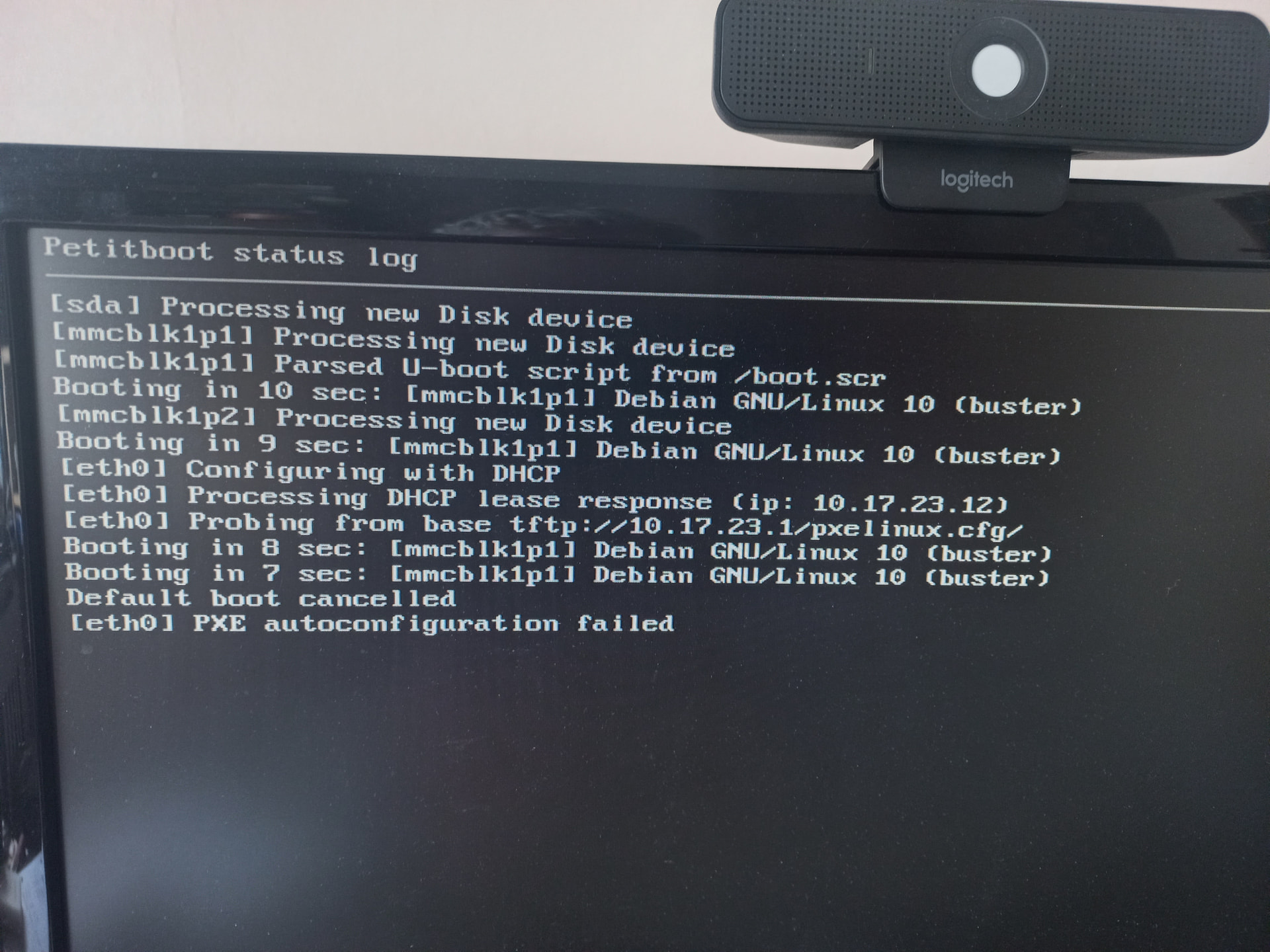
I’ve tried looking at the disk and the card on an Ubuntu machine, and both seem to be OK. That’s just a superficial look, I’ve no idea what should be on the card but it looked like the kind of thing I would expect.
Was this working before and just stopped after a reboot or you are trying to fash a new image?
It was all working fine until yesterday. I rebooted it because Nextcloud wasn’t working, and the web page for it showed that it was in maintenance mode all day. It didn’t come back after rebooting.
Hi Trevor,
Since you’ve already got the SD card and the 1TB disk mounted on your Ubuntu machine, that’s the fastest way to find out what’s going on.
A few things to grab from the mounted filesystems and paste back here:
Disk space — full /var/snap is by far the most common cause of this exact symptom:
df -h
on every partition of both the SD card and the 1TB disk.
Last boot’s journal (replace /mnt/sdcard with wherever the root partition is mounted):
sudo journalctl -D /mnt/sdcard/var/log/journal -b -1 --no-pager | tail -300
That should say exactly which service refused to come up.
- A quick look at platform/nextcloud state:
ls /mnt/sdcard/var/snap/platform/current/
ls /mnt/disk/nextcloud/current/      # or wherever the 1TB disk is mounted
grep -i maintenance /mnt/disk/nextcloud/current/nextcloud/config/config.php
The maintenance flag will tell us whether Nextcloud was stuck in maintenance mode at the time of the reboot.
SD card health — corrupted SD cards on the H4 are common and match the “boots partway then stops” pattern:
sudo smartctl -a /dev/sdX        # the SD card device, not a partition
sudo dmesg | grep -i -E 'mmc|i/o error|ext4|remount-ro'
The journal output from step 2 is the single most useful thing — please paste the last 200–300 lines and we’ll know what to fix.
Also did you have to press button at the bottom of the board last time you booted this device?
trevor@ubuntu:~$ df -h
Filesystem      Size  Used Avail Use% Mounted on
tmpfs           387M  2.3M  385M   1% /run
/dev/sda3        20G   15G  3.3G  83% /
tmpfs           1.9G  4.0K  1.9G   1% /dev/shm
tmpfs           5.0M  8.0K  5.0M   1% /run/lock
/dev/sda2       512M  6.2M  506M   2% /boot/efi
tmpfs           387M  2.5M  385M   1% /run/user/1000
/dev/sdb        932G  132G  800G  15% /media/trevor/d4f8b084-acc2-441f-9fa3-c8a658a55337
/dev/sdc1       248M   24M  212M  11% /media/trevor/BOOT
The /media/trevor ones are from the Syncloud machine. There’s also /dev/sdc2, which is 29.5G but doesn’t seem to be formatted.
The sdcard doesn’t have a /var folder on it. The root folder contains
trevor@ubuntu:/media/trevor/BOOT$ ls -l
total 23812
-rw-rw-r-- 1 trevor trevor    41831 Dec 26  2019 boot-logo.bmp.gz
-rw-r--r-- 1 root   root       4160 Mar  1  2021 boot.scr
-rw-r--r-- 1 root   root       4160 Mar  1  2021 boot.scr.bak
-rw-r--r-- 1 root   root     213479 Feb 24  2021 config-5.11.0-odroid-arm64
-rw-r--r-- 1 root   root        203 Mar  1  2021 config.ini
lrwxrwxrwx 1 root   root         53 Mar  1  2021 dtb -> dtbs/5.11.0-odroid-arm64/amlogic/meson64_odroidc4.dtb
lrwxrwxrwx 1 root   root         53 Mar  1  2021 dtb-5.11.0-odroid-arm64 -> dtbs/5.11.0-odroid-arm64/amlogic/meson64_odroidc4.dtb
drwxr-xr-x 3 root   root       4096 Mar  1  2021 dtbs
-rw-r--r-- 1 root   root    7480539 Mar  1  2021 initrd.img-5.11.0-odroid-arm64
drwx------ 2 root   root      16384 Mar  1  2021 lost+found
-rw-r--r-- 1 root   root    5369254 Feb 24  2021 System.map-5.11.0-odroid-arm64
-rw-r--r-- 1 root   root   11180828 Feb 24  2021 vmlinuz-5.11.0-odroid-arm64
The disk only appears to contain what would normally be in the data folder. There is a nextcloud folder, but it contains the user folders and there is no current folder.
I can’t get smartctl to work. I’ve no idea what kind of device it is - I can’t see anything for an sdcard in a USB caddy (specially not one connected to a windows machine with an Ubuntu VM guest) in the docs.
trevor@ubuntu:~$ sudo smartctl -a /dev/sdc
smartctl 7.4 2023-08-01 r5530 [x86_64-linux-6.8.0-86-generic] (local build)
Copyright (C) 2002-23, Bruce Allen, Christian Franke, www.smartmontools.org

/dev/sdc: Unknown USB bridge [0x058f:0x6332 (0x120)]
Please specify device type with the -d option.
trevor@ubuntu:~$ sudo dmesg | grep -i -E 'mmc|i/o error|ext4|remount-ro'
[    3.305837] sr 3:0:0:0: [sr0] scsi3-mmc drive: 48x/48x writer cd/rw xa/form2 cdda tray
[    4.903295] EXT4-fs (sda3): mounted filesystem 20129714-bf0f-46cf-a623-1d3b1885bbec ro with ordered data mode. Quota mode: none.
[    5.431192] EXT4-fs (sda3): re-mounted 20129714-bf0f-46cf-a623-1d3b1885bbec r/w. Quota mode: none.
[  503.435088] EXT4-fs (sdc1): mounting ext2 file system using the ext4 subsystem
[  503.448089] EXT4-fs (sdc1): warning: mounting unchecked fs, running e2fsck is recommended
[  503.452350] EXT4-fs (sdc1): mounted filesystem 8aebe132-fe1a-4a27-8f39-e411208615d3 r/w without journal. Quota mode: none.
[  991.650247] EXT4-fs (sdc2): VFS: Found ext4 filesystem with invalid superblock checksum.  Run e2fsck?
I didn’t know about the button on the bottom until I read a mention of it on another message today. I just tried it and it goes to the Hardkernel splash screen and nothing else happens (the splash screen stays on).
It’s quite possible I’ve misunderstood how the disks are arranged, and I’m not looking at the right things. I was quite expert in Unix in the 80s, but I’ve never really delved that much into Linux.
Hi Trevor,
That dmesg line is the answer:
EXT4-fs (sdc2): VFS: Found ext4 filesystem with invalid superblock checksum. Run e2fsck?
Your SD card’s root partition has filesystem corruption — that’s why the device gets to the Hardkernel splash and stops, and why Ubuntu didn’t show you a /var folder when you mounted the card (the partition didn’t mount cleanly, so Ubuntu only showed you whatever the mountpoint was beneath, not the partition’s actual contents). The 1TB disk only holding user-data folders is fine — that’s expected; Syncloud apps store their working state under /var/snap/<app>/current/ on the SD card, not on the data disk.
So:
1) Repair the SD card filesystem. With the SD card in your Ubuntu machine, unmount it first, then let e2fsck repair it:
sudo umount /dev/sdc1 /dev/sdc2 2>/dev/null
sudo e2fsck -fy /dev/sdc2
-f forces a check, -y auto-answers yes to repair prompts. Watch the output — it should print a list of corrections and end with “FILE SYSTEM WAS MODIFIED” and a clean exit. Paste that output here.
If e2fsck complains the primary superblock is unreadable, try one of the backup superblocks:
sudo mke2fs -n /dev/sdc2          # just LISTS backup superblocks, doesn't write
sudo e2fsck -b 32768 -fy /dev/sdc2   # use the first backup
2) Once it’s clean, put the SD card back in the H4 and boot. Leave HDMI attached so we can see how far it gets.
3) On the side notes:
- smartctl on a USB-SD adapter usually doesn’t work — most cheap adapters don’t pass SMART through. That’s not the problem here.
- The reset button on the HC4 is just power — pressing it doesn’t reset state, so that didn’t help or hurt.
- A corrupt superblock right after an unclean reboot can be a one-off, but it can also mean the SD card is wearing out. Once the device is back up, copy your important Nextcloud data off and consider replacing the SD card. I can walk you through reflashing a fresh SD with the latest Syncloud image and reattaching the 1TB disk so you don’t lose your files.
Boris
This time the card was /dev/sdb
trevor@ubuntu:/mnt$ sudo e2fsck -fy /dev/sdb2
e2fsck 1.47.0 (5-Feb-2023)
ext2fs_open2: Superblock checksum does not match superblock
e2fsck: Superblock invalid, trying backup blocks...
rootfs: recovering journal
e2fsck: unable to set superblock flags on rootfs


rootfs: ***** FILESYSTEM WAS MODIFIED *****

rootfs: ********** WARNING: Filesystem still has errors **********
trevor@ubuntu:/mnt$ sudo mke2fs -n /dev/sdb2
mke2fs 1.47.0 (5-Feb-2023)
/dev/sdb2 contains a ext4 filesystem labelled 'rootfs'
	last mounted on / on Thu Feb 14 10:11:58 2019
Proceed anyway? (y/N)
trevor@ubuntu:/mnt$ sudo e2fsck -fy /dev/sdb2
e2fsck 1.47.0 (5-Feb-2023)
Pass 1: Checking inodes, blocks, and sizes
Deleted inode 145041 has zero dtime.  Fix? yes

Inodes that were part of a corrupted orphan linked list found.  Fix? yes

Inode 656221 was part of the orphaned inode list.  FIXED.
Pass 2: Checking directory structure
Pass 3: Checking directory connectivity
Pass 4: Checking reference counts
Pass 5: Checking group summary information
Block bitmap differences:  -114692
Fix? yes

Free blocks count wrong for group #1 (66, counted=1131).
Fix? yes

Free blocks count wrong for group #2 (19132, counted=20336).
Fix? yes

Free blocks count wrong for group #3 (32127, counted=28542).
Fix? yes

Free blocks count wrong for group #4 (32768, counted=22627).
Fix? yes
There were over 200 of these errors
Free inodes count wrong for group #80 (8192, counted=5901).
Fix? yes

Directories count wrong for group #80 (0, counted=136).
Fix? yes

Free inodes count wrong (1917274, counted=1903170).
Fix? yes

Padding at end of inode bitmap is not set. Fix? yes


rootfs: ***** FILESYSTEM WAS MODIFIED *****
rootfs: 30142/1933312 files (2.6% non-contiguous), 2800612/7725939 blocks
I put the card and disk back into the Syncloud box, and it booted this time. The HDMI screen showed the Syncloud login prompt, and I was able to log into that.
All the services seem to be working OK except for Nextcloud, which still says it is in Maintenance Mode.
The System updates page says it has 2758, and offers to upgrade to 2773. The Nextcloud page says it has Version 935, and offers to upgrade to 943. I haven’t run either of these upgrades.
We are still fixing the upgrade, but feelf free to run this and send output and logs from support page
snap refresh nextcloud
root@syncloud:~# snap refresh nextcloud
error: cannot perform the following tasks:
- Run configure hook of "nextcloud" snap if present (run hook "configure":
-----
debug CREATE INDEX
debug CREATE INDEX
debug CREATE INDEX
debug CREATE INDEX
debug CREATE INDEX
debug CREATE INDEX
debug CREATE INDEX
debug CREATE INDEX
debug CREATE INDEX
debug CREATE INDEX
debug CREATE INDEX
debug CREATE INDEX
debug CREATE INDEX
debug CREATE INDEX
debug CREATE INDEX
debug CREATE INDEX
debug CREATE INDEX
debug CREATE INDEX
debug CREATE INDEX
debug CREATE INDEX
debug CREATE INDEX
debug CREATE INDEX
debug CREATE INDEX
debug CREATE INDEX
debug CREATE INDEX
debug CREATE INDEX
debug CREATE INDEX
debug CREATE INDEX
debug CREATE INDEX
debug CREATE INDEX
debug CREATE INDEX
debug CREATE INDEX
debug CREATE INDEX
debug CREATE INDEX
debug CREATE INDEX
debug CREATE INDEX
debug CREATE INDEX
debug CREATE INDEX
debug CREATE INDEX
debug CREATE INDEX
debug REVOKE
debug GRANT
debug GRANT
debug You are now connected to database "postgres" as user "nextcloud".
debug SET
debug SET
debug SET
debug SET
debug SET
debug  set_config
debug ------------
debug
debug (1 row)
debug
debug SET
debug SET
debug SET
debug SET
debug GRANT
debug
info executed {"cmd": "/usr/bin/snap run nextcloud.psql -f /var/snap/nextcloud/c                                                                                                                                                             urrent/database.dump postgres", "took": 186.664772372}
info upgrade: database restore done, preparing storage
info prepareStorage: touch .ncdata + chmod storageDir {"dir": "/data/nextcloud"}
info prepareStorage: recursive chown tmp (may be slow on big dirs) {"tmp": "/dat                                                                                                                                                             a/nextcloud/tmp"}
info prepareStorage: chown tmp done, fixing datadirectory in config.php
info prepareStorage: done
info upgrade: storage prepared, running occ status
info occ {"args": ["status"]}
info executing {"cmd": "/snap/nextcloud/current/bin/occ-runner status"}
debug   - installed: true
debug   - version: 32.0.5.0
debug   - versionstring: 32.0.5
debug   - edition:
debug   - maintenance: true
debug   - needsDbUpgrade: false
debug   - productname: Nextcloud
debug   - extendedSupport: false
debug
info executed {"cmd": "/snap/nextcloud/current/bin/occ-runner status", "took": 3                                                                                                                                                             .511379692}
info status {"status": "  - installed: true\n  - version: 32.0.5.0\n  - versions                                                                                                                                                             tring: 32.0.5\n  - edition: \n  - maintenance: true\n  - needsDbUpgrade: false\n                                                                                                                                                               - productname: Nextcloud\n  - extendedSupport: false\n"}
info upgrade: running occ upgrade
info occ {"args": ["upgrade"]}
info executing {"cmd": "/snap/nextcloud/current/bin/occ-runner upgrade"}
debug Nextcloud is in maintenance mode, no apps are loaded.
debug Commands provided by apps are unavailable.
debug Nextcloud is in maintenance mode
debug Maybe an upgrade is already in process. Please check the logfile(data/nextcloud.log). If you want to re-run the upgrade procedure, remove the "maintenance mode" from config.php and call this script again.
debug
error executed {"cmd": "/snap/nextcloud/current/bin/occ-runner upgrade", "took": 1.932983458, "error": "exit status 2"}
error occ failed {"error": "/snap/nextcloud/current/bin/occ-runner [upgrade]: exit status 2: Nextcloud is in maintenance mode, no apps are loaded.\nCommands provided by apps are unavailable.\nNextcloud is in maintenance mode\nMaybe an upgrade is already in process. Please check the logfile (data/nextcloud.log). If you want to re-run the upgrade procedure, remove the \"maintenance mode\" from config.php and call this script again.\n", "output": "Nextcloud is in maintenance mode, no apps are loaded.\nCommands provided by apps are unavailable.\nNextcloud is in maintenance mode\nMaybe an upgrade is already in process. Please check the logfile (data/nextcloud.log). If you want to re-run the upgrade procedure, remove the \"maintenance mode\" from config.php and call this script again.\n"}
Error: /snap/nextcloud/current/bin/occ-runner [upgrade]: exit status 2: Nextcloud is in maintenance mode, no apps are loaded.
Commands provided by apps are unavailable.
Nextcloud is in maintenance mode
Maybe an upgrade is already in process. Please check the logfile (data/nextcloud.log). If you want to re-run the upgrade procedure, remove the "maintenance mode" from config.php and call this script again.

/snap/nextcloud/current/bin/occ-runner [upgrade]: exit status 2: Nextcloud is in maintenance mode, no apps are loaded.
Commands provided by apps are unavailable.
Nextcloud is in maintenance mode
Maybe an upgrade is already in process. Please check the logfile (data/nextcloud.log). If you want to re-run the upgrade procedure, remove the "maintenance mode" from config.php and call this script again.
-----)
I’ve sent you logs as well.
Nextcloud is still in maintenance mode. It’s version 935 and has an Upgrade button for 943.
Hi Trevor,
The “Maybe an upgrade is already in process” message is misleading — there’s no separate upgrade lock. It’s triggered purely by 'maintenance' => true still being set in config.php, left over from when the SD card died mid-occ upgrade.
Try this on the H4, in order:
1. Turn maintenance mode off:
sudo snap run nextcloud.occ maintenance:mode --off
2. Confirm it’s clear by running the upgrade once manually — should be a no-op since you’re still on 935:
sudo snap run nextcloud.occ upgrade
Expected: “Nextcloud is already latest version” (or similar). If you instead see “Maybe an upgrade is already in process” again, run step 1 once more and verify config.php:
grep maintenance /var/snap/nextcloud/current/nextcloud/config/config.php
It should show false.
3. Then refresh:
sudo snap refresh nextcloud
That should land you on the latest revision (954+), which has a reworked post-refresh flow that no longer leaves Nextcloud stuck in maintenance mode if anything is interrupted — so this kind of half-finished upgrade state shouldn’t happen to you again.
One more thing: the e2fsck output had a lot of repaired errors, which usually means the SD card is on its way out. Once you’re back up and running, I’d strongly recommend cloning it to a fresh card before it fails for real.
Let me know how it goes.
Boris
Nextcloud is up and running again, and on the latest version. The desktop app is being a bit odd and seems to be syncing everything again, which is taking a long time. Hopefully it will sort itself out.
There seem to be a few files & folders with names that are 1 alphanumeric character showing on the web interface, that don’t actually exist, but I don’t think there’s anything actually missing.
I’m going to have a go at cloning the card once it has all calmed down.
Thanks for sorting it (fingers crossed).
Looks like I’m going to have to repair the nextcloud database somehow. The files are all fine on the disk in the Syncloud box, but it’s deleting them from the desktop and re-downloading them.
The list of folders and files on the web interface (and on the sync interface on the desktop app) is corrupt. There are several folders missing from the list and there are now more of these one character folders and files.
My contacts list and calendar entries in Nextcloud look to be OK.
After it finished the sync (took most of the night, I think) the files were all on my PC again, but the list on the website was still corrupt. I ran a files scan and repair of the file trees and it looks OK now. Phew!
So next job is to clone the card.